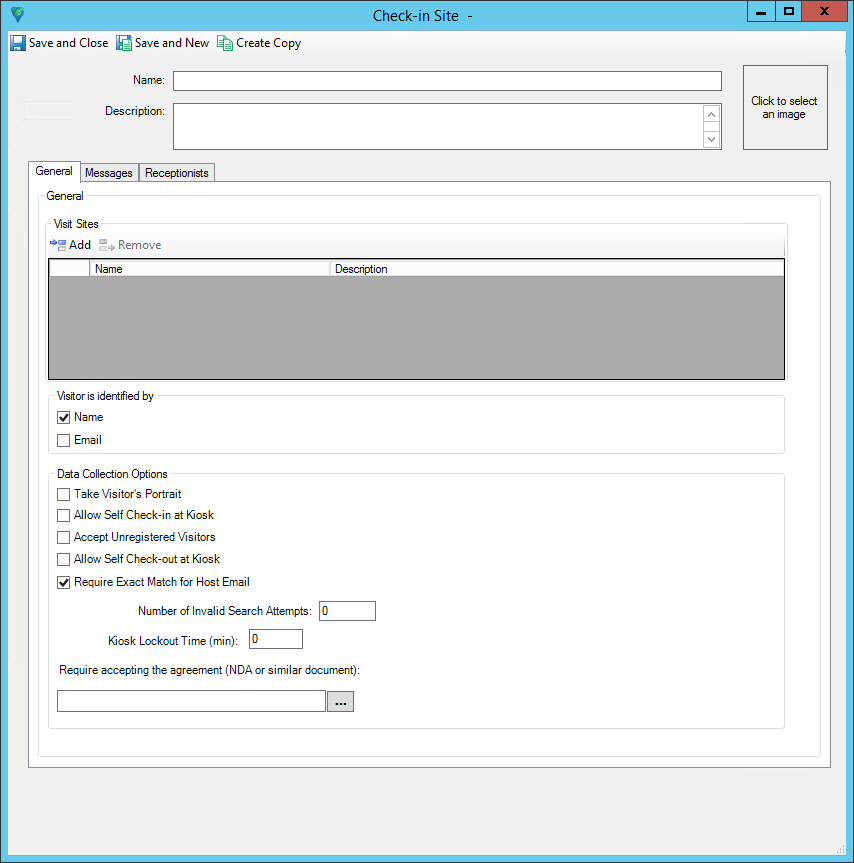
Check-in Site - General tab
Use the Check-in Site General tab to:
- Configure the Check-in Portal Kiosk name and description.
- Choose a time zone for the check-in site.Note: To avoid time zone inconsistencies, make sure the same time zone settings apply to the Check-in Site, C•CURE kiosk device, and C•CURE web portal applications. For more information on time zones, see Visit Site editor - General tab, General tab definitions, and Setting the time zone of Visits to the time zone of a Visit Site.
- Configure how the scheduled Visitor identifies themselves in the Check-in Portal.
- Define the data collection options required when the Visitor is checking-in to the Visit Site.
- Assign one or more Visit Sites so that the appropriate Host is notified when a Visitor checks in.
- Configure self check-in or check-out at the Kiosk.
Figure 1. Check-in Site - General tab