
C•CURE Portal Visitor Management
The Visitor Management application displays after you log onto the C•CURE Portal and select the Visitor Management tile.
Through the Visit Web Portal application, a Visit Host can log on and use the C•CURE 9000 Visitor Management application to manage visits. The Visit host does not need to be a C•CURE 9000 Operator, and they do not need to log on to the C•CURE 9000 Administration client. They can concentrate on the tasks that are directly related to Visits they are hosting.
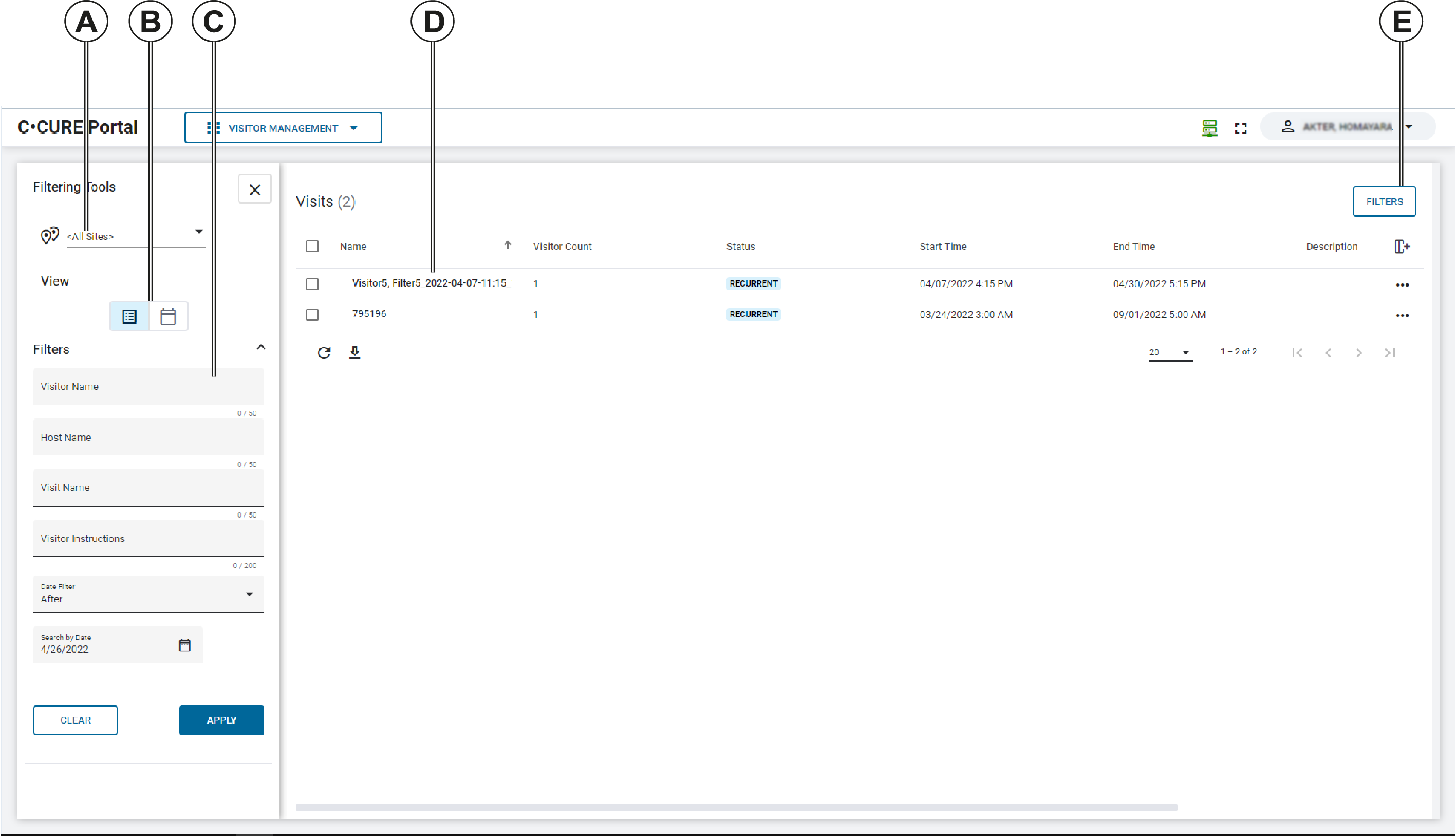
| Callout | Description |
|---|---|
| A | The Visit Site list. You can view all sites, or you can select a Visit Site from the list. |
| B | Use the View icons to display visits in list view, or in calendar view. |
| C | To search for visits, use the Filters in the Filtering Tools bar. |
| D | Site visits appear in this pane. From this pane, you can view the visit status, edit visits, or delete visits. |
| E | Click this button to show or hide the Filtering Tools bar. |