
Creating a visit from a template
You can create a new visit from a template that you have previously saved. The new visit created from the template contains the same settings, fields, and tabs as the template.
- To open the C•CURE Portal pane, in the Navigation pane of the Administration Workstation, click C•CURE Portal.
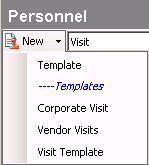
- Select Visit from the drop-down list in the C•CURE Portal pane.
- Click the New down-arrow and from the templates listed under ----Templates, select a template.
- In the Visit editor, configure the visit.
- In the Name field, type a name for the object. The name must be unique.
- To save your new object, click Save and Close.