
Access Approver application
Approvers use the Access Approver portal to approve, reject, revoke, or review an access request that has been submitted by a Requester.
Using the Access Approver application shows how an Approver uses the Access Approver application to approve, reject and manage Access Requests that have been submitted in the C•CURE Portal.
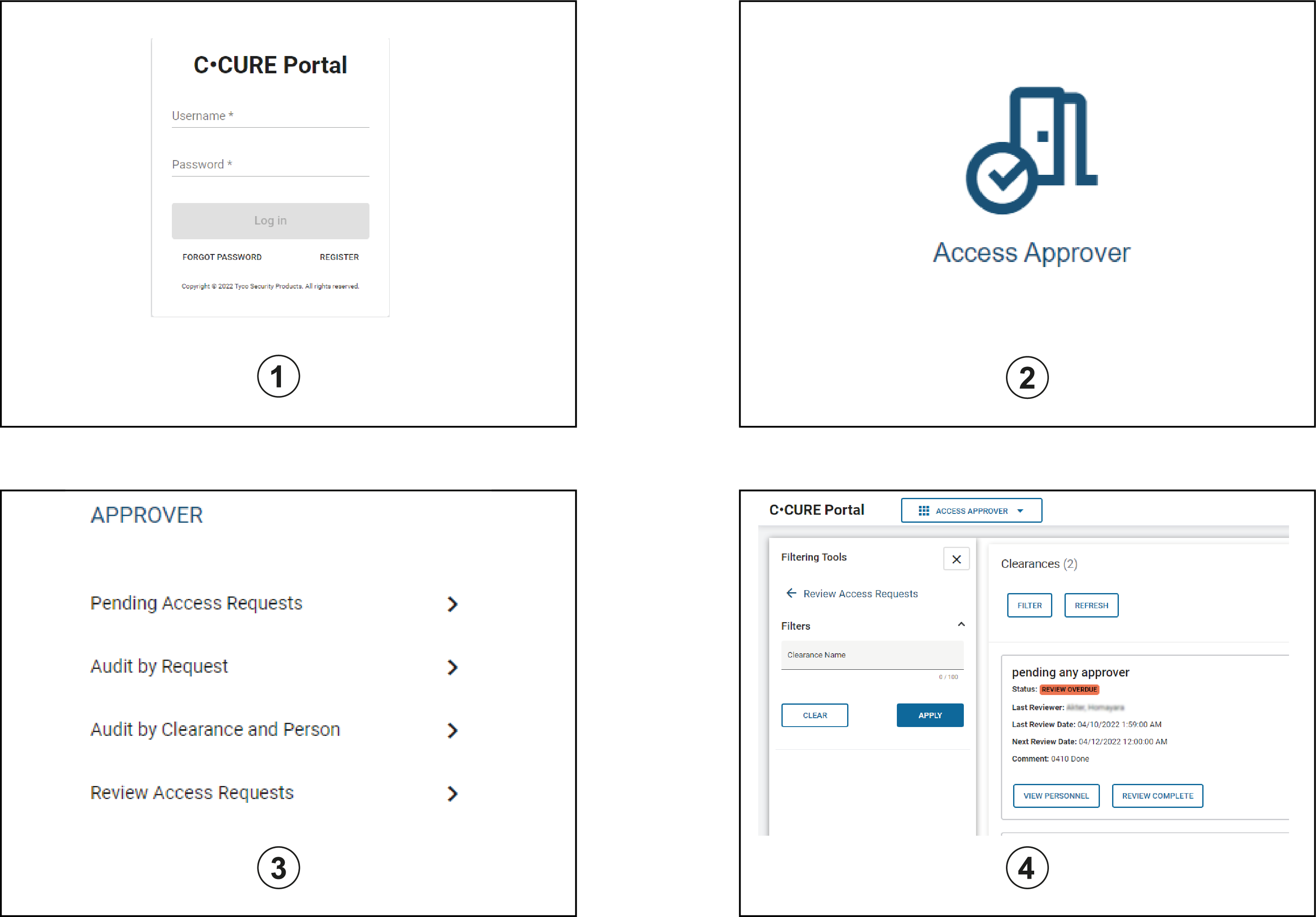
| Callout | Description |
|---|---|
| 1 | The Approver logs on to C•CURE Portal. |
| 2 | The Approver clicks Access Approver. |
| 3 |
The Approver uses the Pending Access Requests, Audit by Request, Audit by Clearance and Person, and Review Access Requests tabs to approve, reject, revoke, renew, or review requests. |
| 4 |
The Requester receives an email notification about updates to a request state. If the Approver approves the request, the clearance is added to the personnel records of all personnel included in the request. For more information, see Access Approver Application Actions. |
The following actions can be carried out by a Requester or Approver in the Access Management Portal:
- Approve and reject Access Requests that have been made to them by Requesters - Approving an Access Request and Rejecting a request
- Search for Access Requests based on their current status - Searching Access Requests
- Manually remove clearance assignments from a previously submitted request. - Removing a clearance
- Audit current clearances to view approval history and request state.
- Review clearance assignments that are up for review. - Reviewing a Clearance.