
Access Requester application
Requesters use the Access Request application to create, submit, access and view requests, and to add attachments to a request. If you are a Requester, you can only view requests that you have created, or requests that you have been included in.
Using the Access Requester application shows how a Requester uses the Access Requester application to create, submit and manage their Access Requests.
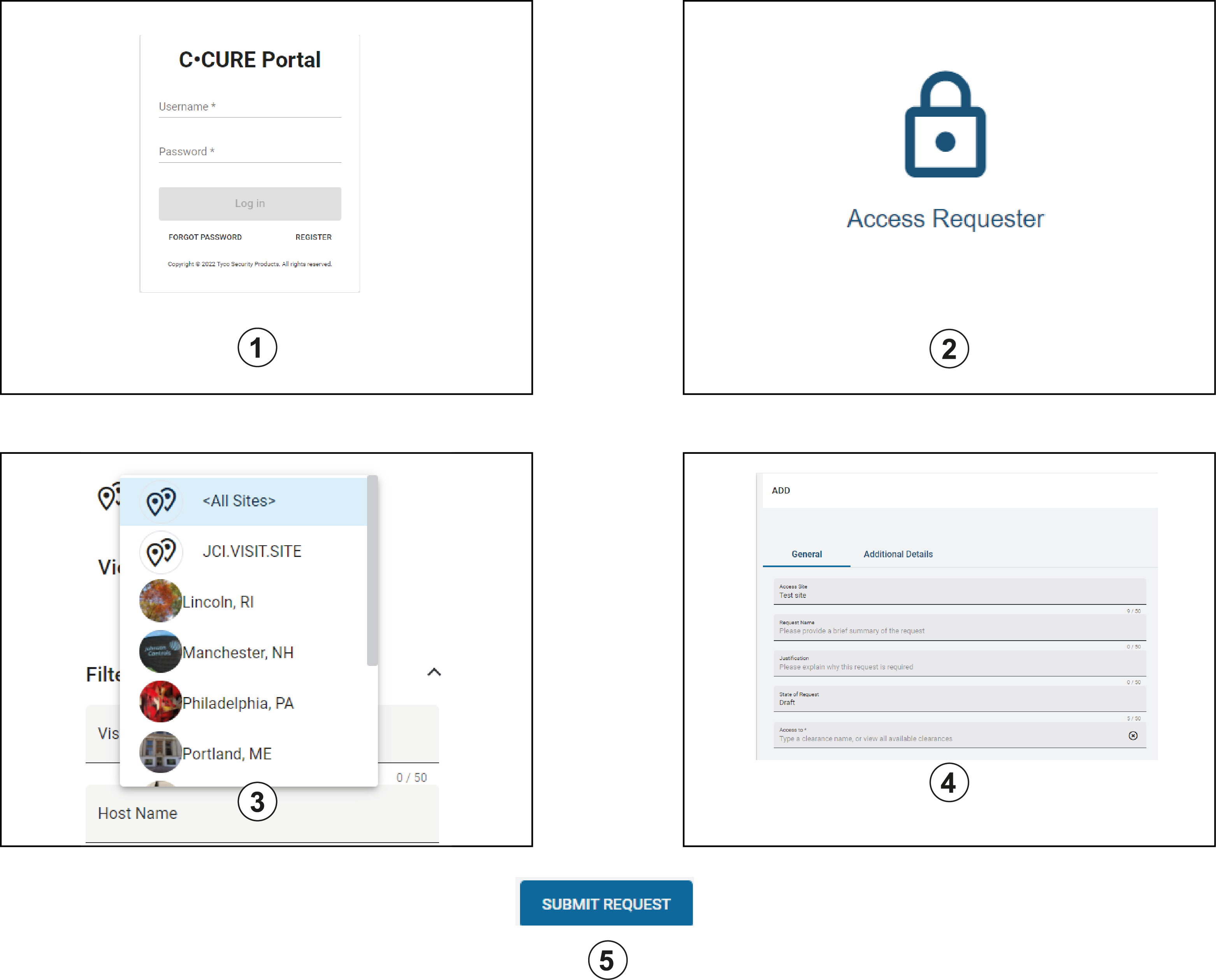
| Callout | Description |
|---|---|
| 1 | The Requester registers for access to the portal and uses either Basic or Windows authentication to log on. |
| 2 | The Requester clicks Access Requester. |
| 3 | The Requester selects an Access Site. |
| 4 |
The Requester creates and submits a new Access Request, or renews or revokes previously submitted Access Requests. They can also delete requests. |
| 5 |
After the Requester submits the request, the Access Request is sent to the access operator. In the Access Approver application, the Approver approves, rejects, renews, or revokes the request. |
The following actions can be carried out by a Requester in the Access Requester Application:
- Submit Access Requests directly to appropriate Personnel who have permission to directly approve the request - Creating an Access Request
- Search for Access Requests based on their current state - Searching Access Requests.
- Revoke and renew previously submitted Access Requests - Revoking an Access Request and Renewing an Access Request.